AWS Developer Tools
👨💻 AWS Cloud Engineer | Around 6 years of Corporate Experience | Driving Innovation in Cloud Solutions 🔧 Day-to-Day Tasks: Specialize in creating AWS infrastructure for Migration Projects. Leveraging services such as S3, SNS, SQS, IAM, Lambda, System Manager, Kinesis, OpenSearch, Cognito, Storage Gateway, Cloud Watch, API Gateway, AWS Event Scheduler, Secret Manager, ECS, Application Load Balancer, VPC among others. Additionally, I excel in crafting Splunk Dashboards and implementing alerting mechanisms for Cloud Watch logs to monitor failures. My approach involves constructing AWS infrastructure using the Serverless framework and Cloud Formation templates, while automating tasks through Boto3 (Python Scripting) Lambdas. 🎯 Passion: I am deeply passionate about continuously learning new technologies and eagerly anticipate the transformative impact of cloud computing on the tech landscape. 📧 Connect: Feel free to reach out to me at awslearningoals@gmail.com. Let's connect and explore potential collaborations! https://www.linkedin.com/in/rastogiutkarsh/
Amazon Cloud Concepts Learning --> Day17
AWS Developer Tools are a collection of services and resources made available by Amazon Web Services (AWS) to assist developers in the rapid and effective development, testing, and deployment of software applications.
AWS Application Composer

Construct and set up serverless apps visually.
Move serverless resources around on a canvas that is accessed through a browser.
Configs with default settings that are ready for deployment are generated.
It is compatible with AWS SAM artifacts and CloudFormation.
AWS Cloud9

Code creator, code executor, and debugger all available through a web browser with this cloud-based integrated development environment.
Prepackaged with tools for widely used languages such as PHP, Python, and JavaScript.
Cloud-based IDE that can be accessed from any internet-connected location.
The building of serverless apps is done seamlessly.
Facilitates cooperation through instantaneous pair programming.
Makes it easier for the team to share development environments.
AWS CloudShell
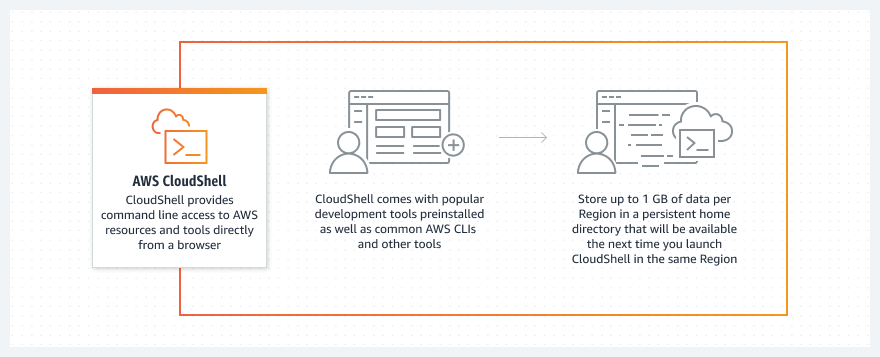
Shell that runs in the browser to control AWS resources.
Console credentials used for pre-authentication.
Equipped with standard development and operational tools out of the box.
Utilize AWS SDKs for experimentation, run AWS CLI scripts, and more.
Available through a browser no extra charge.
AWS CodeArtifact

Software package storage, publishing, and sharing made safe with a fully controlled artifact repository.
Obtains requirements and packages automatically from public repositories.
Compliant with widely used build tools and package managers like as NuGet, npm, and Maven.
Fits with existing development workflows with ease.
AWS CodeBuild

A managed build solution generates deployable software packages, testing, and source code compilation.
It scales autonomously and does not require management of build servers.
Minimizes wait times by supporting parallel builds.
Provides unique setups with its own build tools or bundled build environments.
Amazon CodeCatalyst

Service integration for the implementation of CI/CD.
Complete AWS management, including all required instruments.
Organize tasks, work together on the code, and create, test, and release apps.
By linking accounts, you may integrate AWS resources.
To release software quickly and with confidence, manage every stage of the application lifecycle with a single tool.
AWS CodeCommit
2.b33016d587d4c7aa6f132753294929982e2648b4.png)
Hosting solution for Git repositories that is fully managed.
Secure and expandable private repositories.
Removes the requirement for self-hosted source control platforms.
Allows for the storing of binaries, source code, and other files.
Smooth interaction with current Git tools.
AWS CodeDeploy

Code deployments to EC2 instances and on-premises systems are automated.
Reduces downtime during deployments and speeds up the introduction of new features.
Reduces human error in software installations by automating the process.
Easily handles application changes and scales to be deployed to hundreds of instances.
AWS CodePipeline

Continuous delivery service that is fully managed.
Release pipelines are automated for dependable, quick updates.
Builds, tests, and deploys stages automatically according to the release model.
Connects to other services such as GitHub.
Pay-per-use arrangement without any long-term obligations or up-front costs.
Amazon Corretto
OpenJDK is distributed for free across several platforms.
Extended support that includes security updates and performance improvements.
Utilized on hundreds of production services internally by Amazon.
Verified to be in line with the Java SE specification.
Makes it possible to create and run Java applications on well-known platforms including Windows, macOS, and Amazon Linux 2.
AWS Fault Injection Service
Service that is fully managed to do experiments on fault injection on AWS.
Makes chaotic engineering easier by emphasizing applications that cause disruptions.
Aids in locating performance bottlenecks, blind areas in monitoring, and hidden problems.
Provide controls with automatic rollback or stop conditions for doing tests in production.
Enhances application robustness by simulating real-world situations through complicated scenarios.
AWS X-Ray

Examine and troubleshoot distributed applications, particularly microservices-based ones.
Recognize application performance issues and their underlying causes.
Provides a view of requests from beginning to end and arranges application components.
Examine production and development apps with varying degrees of complexity.
Note: All Images are from AWS Official Document
"Thank you for reading! If you found this blog helpful, don't forget to subscribe and follow for more insightful content. Your support keeps me motivated to bring you valuable insights. Stay updated and never miss out on our latest posts. Feel free to leave comments or suggestions for future topics. Happy learning!"
https://awslearner.hashnode.dev/amazon-web-services-via-category


