Amazon Virtual Private Cloud (VPC)
👨💻 AWS Cloud Engineer | Around 6 years of Corporate Experience | Driving Innovation in Cloud Solutions 🔧 Day-to-Day Tasks: Specialize in creating AWS infrastructure for Migration Projects. Leveraging services such as S3, SNS, SQS, IAM, Lambda, System Manager, Kinesis, OpenSearch, Cognito, Storage Gateway, Cloud Watch, API Gateway, AWS Event Scheduler, Secret Manager, ECS, Application Load Balancer, VPC among others. Additionally, I excel in crafting Splunk Dashboards and implementing alerting mechanisms for Cloud Watch logs to monitor failures. My approach involves constructing AWS infrastructure using the Serverless framework and Cloud Formation templates, while automating tasks through Boto3 (Python Scripting) Lambdas. 🎯 Passion: I am deeply passionate about continuously learning new technologies and eagerly anticipate the transformative impact of cloud computing on the tech landscape. 📧 Connect: Feel free to reach out to me at awslearningoals@gmail.com. Let's connect and explore potential collaborations! https://www.linkedin.com/in/rastogiutkarsh/
Amazon VPC Concepts --> Day1
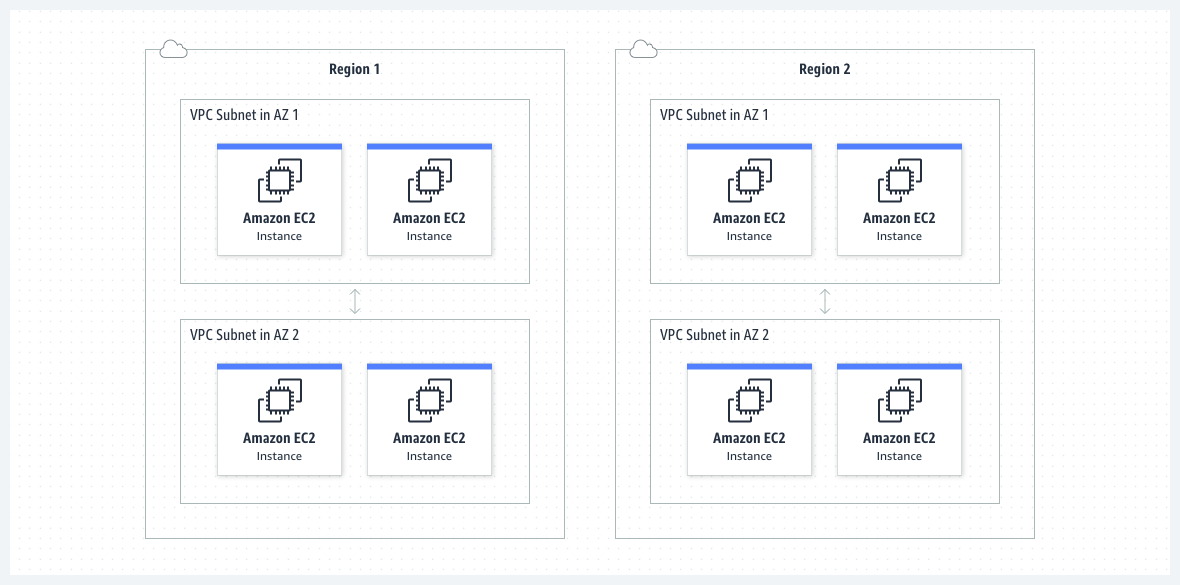
VPC lets you provision a logically isolated section of the AWS Cloud where you can launch AWS resources in a virtual network that you define.
VPC is the networking layer for many AWS services.
A VPC spans all the Availability Zones in the region.
Basic Concepts in VPC
Subnet
A Subnet is a range of IP Addresses in your VPC. Each subnet must reside in a single availability zone and cannot span zones.
Contents for Subnet
Subnet IP address range
While creating subnet we specify its IP addresses base on the configuration of the VPC.
IPv4 only – Subnet consists of IPv4 CDIR blocks only and communicate over IPv4.
IPv6 only - Subnet consists of IPv6 CDIR blocks only and communicate over IPv6.
Dual Stack- Subnet consists of both IPv4 and IPv6 CDIR blocks and communicate over IPv4 and IPv6.
Subnet Types
Subnet type is determined by how we configure routing for our subnets.
Public subnet – A public subnet enables resources to access the internet directly via an internet gateway.
Private subnet – A private subnet requires a NAT device for internet access.
VPN-only subnet - A VPN-only subnet has a route to a Site-to-Site VPN connection, but no access to the internet gateway.
Isolated subnet - An isolated subnet has no external connectivity and can only be reached within the VPC.
Subnet Routing
Each subnet requires an associated route table defining outbound traffic routes.
Every Subnet automatically associated with main route table for the VPC.
We can change association and contents of main route table.
Subnet Settings
Every subnet has a modifiable attribute determining whether a network interface created within it receives a public IPv4 and IPv6 address.
Including the primary network interface (eth0) of instances launched in that subnet.
Setting can be overridden for individual instances during launch.
After creating a subnet, we can modify settings as:
Auto-assign IP settings - This allows to configure auto-assign IP settings to automatically request a public IPv4 or IPv6 address for a new network interface in this subnet.
Resource-based Name (RBN) settings – Enables to specify the hostname type for EC2 instances in this subnet and configure how DNS A and AAAA record queries are handled.
Routing Table
A route table contains a set of rules called routes, that determine where network traffic from your subnet or gateway is directed.
Route table concepts
Main route table - The route table that automatically comes with your VPC. It controls the routing for all subnets that are not explicitly associated with any other route table.
Custom route table - A route table that you create for your VPC.
Destination - The range of IP addresses where you want traffic to go.
Target - The gateway, network interface, or connection through which to send the destination traffic for example, an internet gateway.
Route table association - The association between a route table and a subnet, internet gateway, or virtual private gateway.
Subnet route table - A route table that is associated with a subnet.
Local route - A default route for communication within the VPC.
Propagation - If you have attached a virtual private gateway to your VPC and enable route propagation, we automatically add routes for your VPN connection to your subnet route tables.
Gateway route table - A route table that is associated with an internet gateway or virtual private gateway.
Edge association - A route table that you use to route inbound VPC traffic to an appliance.
Transit gateway route table - A route table that is associated with a transit gateway.
Local gateway route table - A route table that is associated with an Outposts local gateway.
Gateways and endpoints
A gateway connects your VPC to another network. For example,
internet gateway is used to connect your VPC to the internet.
VPC endpoint to connect to AWS services privately without use of any internet gateway or NAT device.
Peering connections
Use a VPC peering connection to route traffic between the resources in two VPCs.
Traffic Mirroring
Copy network traffic from network interfaces and send it to security and monitoring appliances for deep packet inspection.
Transit gateways
Use a transit gateway which acts as a central hub, to route traffic between your VPCs, VPN connections, and AWS Direct Connect connections.
VPC Flow Logs
A flow log captures information about the IP traffic going to and from network interfaces in your VPC.
VPN connections
Connect your VPCs to your on-premises networks using AWS Virtual Private Network.


